330 Etsy Listings Mockup Bundle: Streamline Your Shop
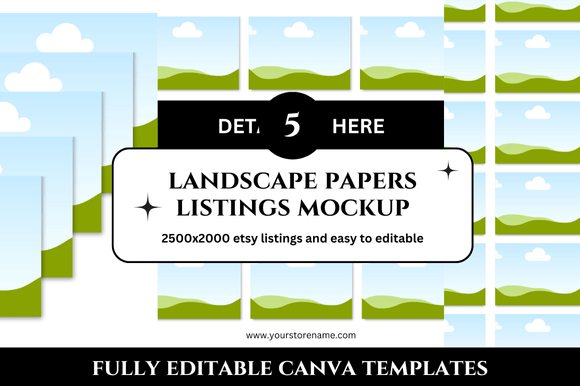
Running an Etsy shop means constantly balancing product creation with presentation. You might have beautiful digital products, printables, or handmade goods, but if your listing images don’t look polished, potential buyers may scroll past. The 330 Etsy Listings Mockup Bundle is a complete set of Canva templates designed to give every item in your shop a clean, professional look without requiring hours of design work. With 330 individual mockups at 2500 x 2000 pixels, this bundle covers everything from banners and covers to square listings and planner mockups — all ready for instant download and customization.
What makes this bundle particularly useful is its sheer versatility. Instead of buying separate mockup sets for different product types, you get a single library of templates that can handle a wide range of listing formats. Whether you sell digital planners, printable wall art, or social media templates, you’ll find matching mockups that make your shop look cohesive and trustworthy. This article explores how you can make the most of this bundle, adapt it to your specific audience, and keep your listings clear, consistent, and effective.
What the Bundle Actually Includes
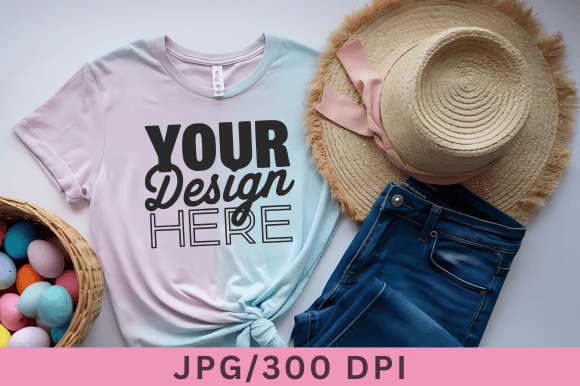
The bundle offers 330 Canva mockup templates, each designed to help you showcase your digital products in a realistic and appealing way. The dimensions (2500 x 2000 px) are large enough for high-resolution previews while remaining easy to edit in Canva’s free or pro version. You receive templates for Etsy listings, shop banners, square listings, planner mockups, and printable bundles — all with a clean, minimal aesthetic that works well across different niches.
Because the templates are fully customizable, you can change colors, fonts, backgrounds, and product images to match your brand. The instant download means you can start editing within minutes, and the included bonus freebies add extra value for those who want to go beyond standard listings. For sellers who want to maintain a consistent visual identity without reinventing the wheel each time, this bundle removes much of the repetitive work.
Creative Possibilities for Different Product Types
One of the strongest aspects of this collection is that it supports multiple product formats within a single design system. Here are some ways different types of sellers can use the templates:
- Digital planners and organizers: Use the planner mockups to show your product on a tablet, desk, or notebook. Buyers can instantly imagine using your planner in their daily routine. The square listing templates work especially well for showing multiple pages or layouts in one image.
- Printable wall art and prints: The banner and cover templates let you display framed prints, gallery walls, or individual pieces in a lifestyle context. A clean background keeps the focus on your artwork while still giving it a realistic setting.
- Social media templates and branding kits: Mockups that feature screens or devices help buyers see how your templates look when used on Instagram, Pinterest, or Etsy itself. This builds trust and reduces hesitation.
- Etsy shop bundles: If you sell bundled products, use the mockups to show each item separately and then together. This helps customers understand what they’re getting and increases perceived value.
Each of these applications benefits from the bundle’s consistent sizing and style. You don’t have to worry about mismatched proportions or clashing backgrounds — everything is designed to work together.
Adapting the Bundle for Different Audiences
Not every Etsy buyer is the same, and your listing images should reflect the preferences of your target audience. The 330 Etsy Listings Mockup Bundle makes this adaptation straightforward because you can tweak the templates without starting from scratch.
For example, if your audience is busy entrepreneurs and freelancers, consider using mockups that highlight productivity and organization. A clean desk setup with a tablet displaying your product communicates efficiency. If your audience is hobbyists and crafters, lifestyle mockups with cozy, warm tones and handmade props create a more inviting feel. For educators and bloggers, mockups that include notebooks, pens, and coffee cups can make your product feel relatable and useful.
The key is to think about what your ideal customer values. Do they want minimalist, clutter-free visuals? Or do they respond better to vibrant, patterned backgrounds? Because the bundle includes a wide range of layouts, you can choose the mockup style that matches your audience’s expectations and then adjust the colors and typography accordingly.
Practical Inspiration for Using the Templates
To get the most out of this bundle, think beyond simply inserting your product into a frame. The following ideas can help you create listings that stand out while remaining professional:
- Create a consistent shop aesthetic — Use the same set of mockup styles across all your listings. This builds brand recognition and makes your shop look curated. Even if you sell different types of products, a consistent background color or prop style ties everything together.
- Use mockups to tell a story — Instead of showing just one image, create a sequence of mockups that show how the product is used. For example, a digital planner could appear first on a desk, then in a bag, and finally on a tablet. This narrative approach helps buyers visualize the product in their own lives.
- Highlight key features — If your product includes bonus freebies, create a mockup that specifically showcases those extras. A flat lay with the main product plus bonus items communicates value and encourages purchase.
- Test different layouts — Because you have 330 templates, you can experiment with different arrangements. Try a mockup with a single product focus for one listing and a multi-product collage for another. See which style drives more clicks and conversions.
These techniques work because they respect the buyer’s time. A clear, well-composed mockup answers questions quickly and reduces the mental effort needed to evaluate your product.
Staying Organized and Consistent
With 330 templates, staying organized is essential. Here is a practical approach to managing your mockup library:
- Sort templates by category — Create folders within Canva or on your computer for banners, square listings, planner mockups, covers, and bonus items. This saves time when you need a specific format.
- Create a brand kit in Canva — Save your brand colors, fonts, and logos so you can apply them consistently across all mockups. This also makes updating multiple listings faster.
- Use naming conventions — Rename your mockup files with clear labels, such as “Planner_Mockup_Tablet_v1” or “Banner_Print_Landscape.” This helps you find the right template quickly when you’re editing multiple listings.
- Batch your editing — Set aside a few hours to customize all the templates you plan to use. Duplicate the base templates, apply your branding, and then swap in product images as needed. This approach keeps your workflow efficient and your results consistent.
Consistency in your listing images signals professionalism. Buyers are more likely to trust a shop that looks intentional about its presentation. The bundle gives you the tools to achieve that without needing to be a graphic designer.
Customization Tips for a Unique Look
While the templates are ready to use out of the box, a few small customizations can make them feel uniquely yours. Start by adjusting the background colors to match your brand palette. If the default mockup uses a neutral gray, swap it for a soft pastel or warm beige that complements your product. Change the orientation of props or devices if the template allows it — sometimes a slight angle makes the image feel more organic.
You can also add subtle textures or shadows to give depth. In Canva, overlay a faint paper texture or increase the drop shadow on your product image to make it pop. Just be careful not to overdo it — the goal is a clean, professional appearance, not a busy or distracting one.
For sellers who sell multiple product types, consider creating a signature layout style that appears in every listing. For example, always place your product on the left side with a brief text overlay on the right. This creates a consistent visual signature that customers will recognize as your brand.
Balancing Speed with Quality
One of the biggest advantages of a prepared mockup bundle is the time it saves. Instead of designing each listing from scratch, you can focus on the product itself and let the templates handle the presentation. However, speed should not come at the expense of quality. Always check that your product images are high resolution, that the mockup dimensions match Etsy’s requirements, and that the final image looks crisp on both desktop and mobile.
Before publishing a batch of listings, preview them on an actual Etsy shop page or use Canva’s mockup preview to see how they appear in search results. If something feels off — maybe the product is too small or the background distracts — make adjustments before going live. This extra step ensures that your investment in the bundle pays off with better engagement and sales.
Who Benefits Most from This Bundle
The 330 Etsy Listings Mockup Bundle is particularly helpful for sellers who want to grow their shop without hiring a designer. Designers themselves can use it as a time-saving foundation for client projects. Bloggers and content creators who sell digital products on Etsy will appreciate having a library of mockups ready for each new release. Even educators and hobbyists who sell only a few items can benefit from the professional look that consistent mockups provide.
If you are new to selling on Etsy, this bundle removes one of the biggest hurdles — creating listing images that look trustworthy and appealing. If you are an experienced seller, it helps you maintain a consistent brand across a large inventory without spending hours on each listing. In both cases, the bundle supports your creative work by handling the repetitive design tasks.
Final Thoughts on Making the Bundle Work for You
A well-organized mockup library is one of the most practical investments you can make for your Etsy shop. The 330 Etsy Listings Mockup Bundle gives you the flexibility to present your products in a polished, professional way while saving hours of time. By focusing on your audience, staying consistent with your branding, and using the templates as a starting point for your own creative touches, you can build a shop that feels cohesive and trustworthy.
Whether you are launching your first product or expanding an existing shop, having a reliable set of mockups allows you to focus on what matters most: creating quality products that your customers will love. Take the time to explore the templates, adapt them to your style, and enjoy the process of designing a shop that truly reflects your creative vision.